Welcome to the Learner's Guide!

This guide is your roadmap to getting started on CERES e-learning platform, where you will access CERES courses. Here,  you will  find everything you need to know to begin your learning journey—from creating your account and enrolling in courses to navigating the platform’s features.

How to create an account?


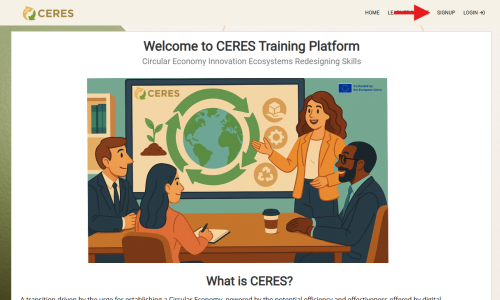
  1. Click on the “sign up”  button on the top right side of the page.
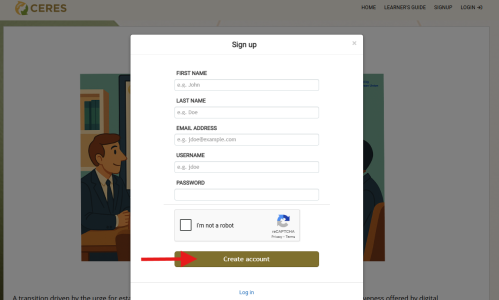
  2. Complete the form and click “Create account”.
  3. Once the account is created, it will redirect to the learner's profile.
  4. The learner will also receive an email with the link to the e-learning platform and the credentials.


How to enroll to a course?


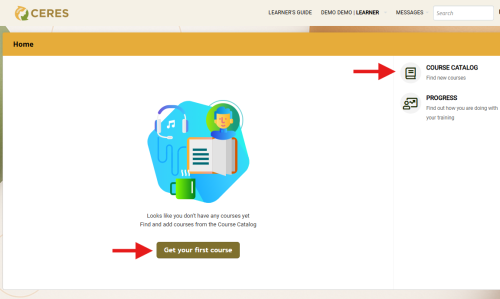
After logging in, access the course catalog, where you can see the courses available.

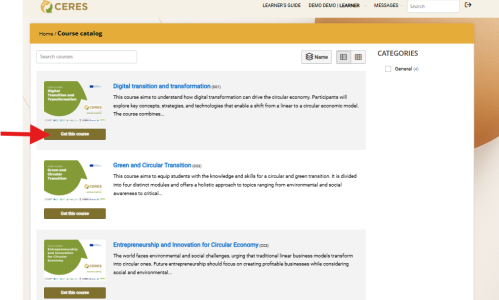
From the course catalog, find the course of your interest and click "Get This Course."

From the course catalog, find the course of your interest and click "Get This Course."

Study at your own pace!


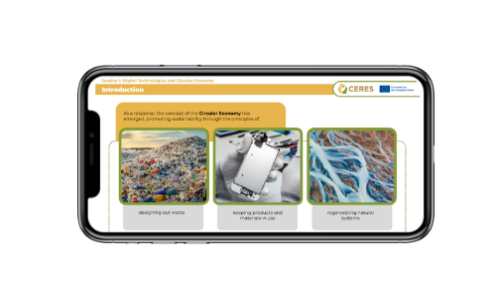
• Mobile-Friendly: The platform is designed for use across devices, enabling learning on the go.
• Accessible offline: Learners can download courses, complete them offline, and sync their progress when back online. Available only on the mobile app.
The TalentLMS mobile app is available for Android and iOS devices. 

To access the CERES e-learning platform on the go, please follow the steps below:
1. Download the TalentLMS app on your device.
2. In the domain section, add "ceres-circulareconomyalliance".
3. Log in with your credentials. 

• Mobile-Friendly: The platform is designed for use across devices, enabling learning on the go.
• Accessible offline: Learners can download courses, complete them offline, and sync their progress when back online. Available only on the mobile app.
The TalentLMS mobile app is available for Android and iOS devices. 

To access the CERES e-learning platform on the go, please follow the steps below:
1. Download the TalentLMS app on your device.
2. In the domain section, add "ceres-circulareconomyalliance".
3. Log in with your credentials.